


Joomla 3 allows you to create more complex content and add specific functionality on top of the standard articles that consist of text, images and links. You can do that via the Components manager.
Content created with Components manager
By default, the Components manager includes several options for adding more complex page types and other content to your Joomla website. Joomla 3 comes with a few preinstalled components that allow you to create special page types: Contacts, News feeds, Search, Smart Search and Web links.
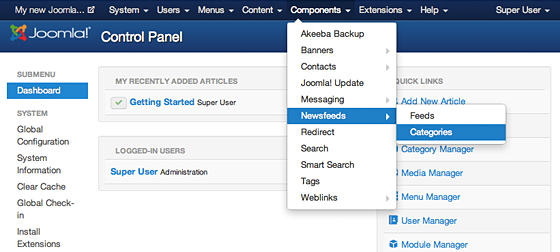
If you want to create a page with news feed for example, you need to go to Components -> Newsfeeds -> Feeds and than click the big green NEW button.
Important : Whenever you create new content with a component, make sure you go to the list of items for the particular component and change the status to Published by clicking on the red cross and turning it to a green checkbox. Otherwise, the content won’t be displayed on your website.
Linking the content created with Components in the Joomla menu
To link content created with the Components manager in your website menu, you need to go to the Menu manager:
Once you click on Create New Menu Item you need to select the type of the Item you will add:
Find the corresponding line for the component you have used, for example if you are trying to create a News feeds page, click the News feeds link from the list.
Now, you need to select the exact Feed the menu should link to. To do that click on the Select button next to the Feed field and choose the newly created Test feed. Finally, press the Save button to publish this menu item on your website.