


In this group of tutorials we will teach how to create a simple Joomla site with basic skills. We believe that once you understand the Joomla 3 structure and the way the application works, it will become much easier for you to create the site that you want. However, Joomla 3 has endless capabilities and it is easy for the unexperienced user to get lost in the sea of information. This is why, we have focused on the fundamental knowledge that is really required.
How to create Joomla articles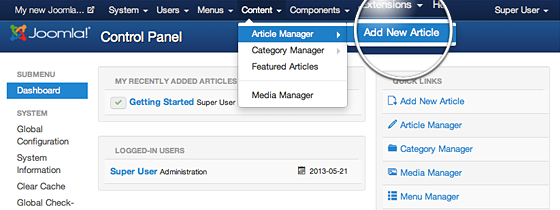
Basically, the content for most of your standard pages that consist of text, images and hyperlink will be created in the Article Manager, which can be accessed through the Content menu item in your Joomla 3 admin page:

When you click on Add New Article, you will see a WYSIWYG editor that you can use to write and format your new article text, add images & links to it, and more:
Important To make your article visible on your website for all visitors, you need to put it on Published status and Public Access
How to link articles in the Joomla 3 menu
Once you have created your article you will most probably want to link it in the menu of your website, so that your visitors can actually be able to find and see it. To do this you need to use the Main menu manager.
After you have indicated that you want to create a new menu item, you will have to select the type of the menu item:
Since we will be linking content created through the Article manager we should click on the Articles link
in the list. If you want the new menu to simply open the article you have just created simply press the Single Article option.
Once you choose this option, a box for selecting which article exactly you wish to link to will appear: